The 3 Most Common Scientific Instrument Problems (and How to Fix Them)
Results that suddenly look wrong, hardware that won't cooperate, and error codes nobody recognizes. Here's what hundreds of scientists and service engineers ask Rayni, and where the answers were hiding.
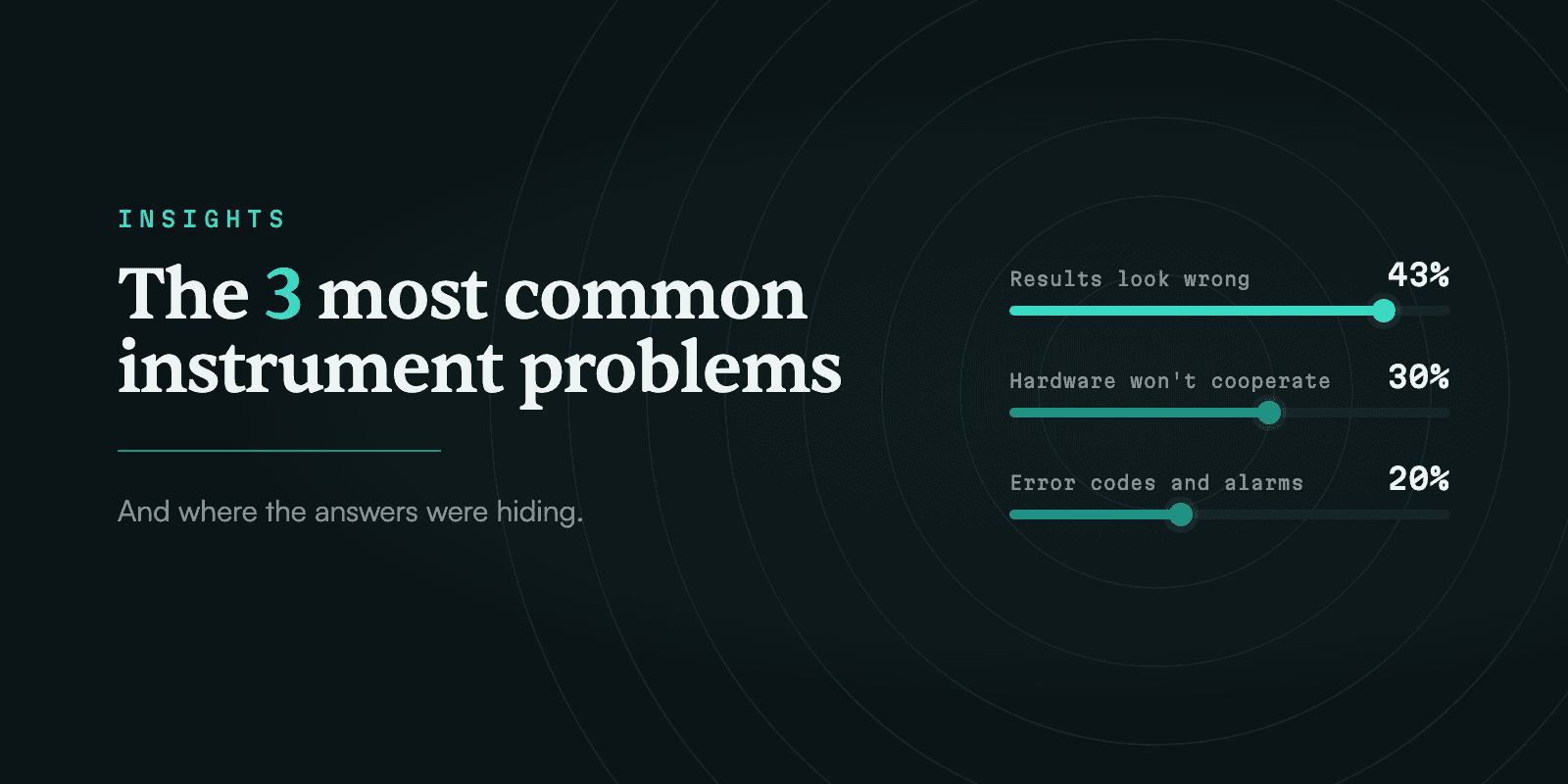
We looked at anonymized, aggregated usage data from hundreds of scientists and service engineers who use Rayni to troubleshoot daily. We identified three groups of common problems our users face: results that suddenly look wrong, hardware that won't cooperate, and error messages nobody recognizes. The answer to all of them already sits in the manual. It is just hard to find on page 412.
How we looked at this
We reviewed aggregated usage data from 1,900+ instruments available in the Rayni platform, between January and September 2026. They came from 50+ organizations, including universities, core facilities, service companies, and individual scientists.
We found that the scientists and engineers were facing three common challenges:
1. "My results suddenly look wrong"
43% of troubleshooting questions were about how the data suddenly looks wrong when it looked fine a few runs ago. This was the biggest group by far, from 30+ institutions covering Core Facilities, Field Service Orgs, and Other research facilities.
Three patterns dominated:
- Pressure, flow and leaks. After purging the pumps, pressure won't build. Or: The gas flow on GC reads far lower than the setpoint.
- Lost signal or sensitivity. Signal dropped by about half over the past week on samples that ran fine before.
- Peak shape and retention. Every peak in the run is splitting. What changed?
Why it happens so often
These problems build slowly. A seal wears, a frit clogs, a source gets dirty, a gas line changes. Because the problems build up slowly, scientists or engineers don't receive an error code immediately. So the first sign of something going wrong is usually bad data. By then the instrument user has to work backward through a lot of possible causes.
How Rayni helped users solve these issues
Rayni works through the same checks an experienced engineer would, starting with the easiest-to-check options, and ties each step to the trusted source document page it came from.
- Compare against a known-good run. Rayni helps you check whether a standard on the same method also looks wrong. If it does, the problem is the instrument. If it doesn't, look at the sample or the method.
- Check what changed recently. Rayni asks about a new solvent bottle, a column swap, a new gas cylinder, or a moved line before suggesting anything that costs money.
- For pressure problems, isolate sections. Rayni walks through the pump's pressure test and explains what a failed result means. When a user's pump reached only about a third of its target pressure during the test, Rayni answered from the pump's service manual: cap the flow path with a blank nut, then move it upstream one module at a time until the leak shows up (see Figure 1).

Figure 1. Rayni answers a failed pressure test from the pump's manual and opens the System Pressure Test page. Demo questions are simplified from anonymized, aggregated usage data and recorded in a Rayni demo account.
- For lost signal, look at the tune or calibration report. Rayni explains what to compare in the report and links to the tuning and source-cleaning pages for that instrument.
- Then look at consumables. Rayni pulls the service intervals for seals, check valves, liners, septa, and filters from the maintenance chapter, so you can see what's overdue.
2. "The instrument won't start, move or connect"
30% of troubleshooting questions were related to hardware issues: an autosampler that won't find its vials, a door that won't close, an instrument that won't power on, or software that lost contact with the instrument.
Typical hardware issues:
- The autosampler keeps failing its alignment step.
- The instrument is not getting online after a power outage.
Why it happens so often
Mechanical and electrical parts wear out, and power events reset settings. These questions also come heavily from service engineers, who work on many instrument brands in a single week.
How Rayni helped users solve these issues
Service engineers use Rayni to pull the right procedure or diagram for the instrument in front of them, with the page cited, instead of hunting through a shared drive of PDFs.
- Power-cycle in the order the manual specifies. Rayni gives the startup sequence from the manual, including whether the computer, the software or the instrument comes first.
- Check cables and physical stops. Rayni lists the connections and mechanical checks the manual calls out for that module, like a tray that isn't fully seated or a bent needle.
- Read the status lights and the error log. Rayni explains what a message or log entry means and which module it points to. One engineer changed an autosampler's needle, and the alignment step afterward wouldn't finish. Rayni went to the error-information pages of the autosampler manual, where that alignment failure is listed with a mechanical obstruction as the first cause to check (see Figure 2).
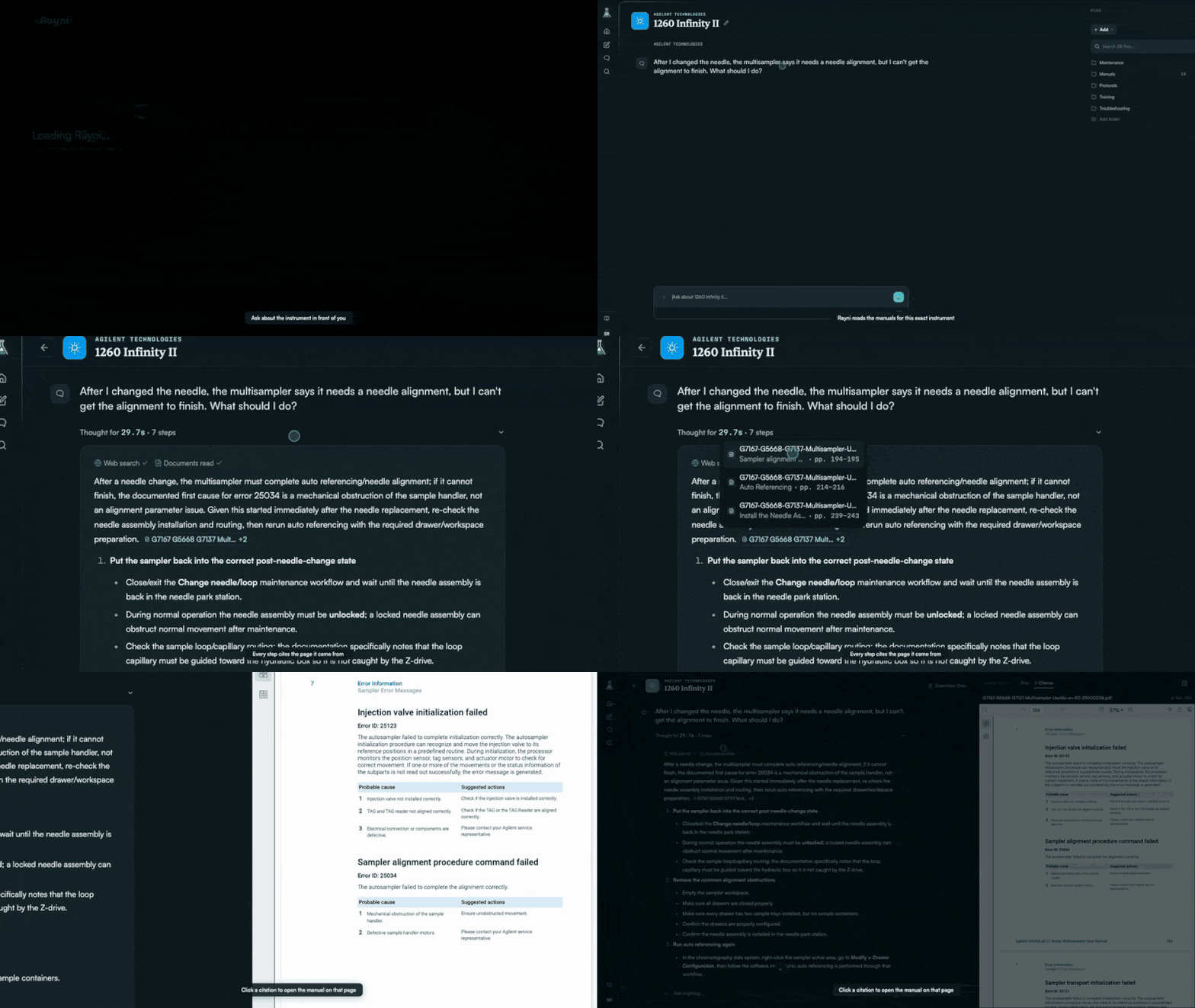
Figure 2. Rayni finds the alignment failure in the autosampler manual's error pages and shows the likely cause. Demo questions are simplified from anonymized, aggregated usage data and recorded in a Rayni demo account.
- Before opening covers, find the service manual section. Rayni points to the right procedure and its safety steps, so board-level work starts on the right page.
3. "What does this error code mean?"
20% of troubleshooting questions were about error codes or alarms. Error codes are just numbers that don't tell users anything. Alarms are just ominous displays and sounds that give no real information on how to fix the underlying issue.
Typical questions:
- An alarm appeared after a recent installation of a gas cylinder.
- A sample run sequence is blocked by an error code.
Why it happens so often
A lot of day-to-day issues can result in an error code that is built in to prevent inexperienced users from further tinkering with the system and worsening the situation. Error codes are built to tell engineers and experts what's wrong. Many underlying causes can lead to the same error code and finding them requires serious expert intervention. The explanation for an error code often sits in a table deep in the manual, sometimes in a different manual than the one on the shelf. Many error codes can be resolved with simple operations any user can take, such as switching the instrument off and back on!
How Rayni helped users solve these issues
Paste the code or a photo of the screen. Rayni finds the entry in the manufacturer's error table for your instrument, links to the exact page and walks through the fix.
- Write down the exact code and message. Rayni matches the code against the error table for your model, so two codes that look alike don't get mixed up.
- Note what the instrument was doing when it appeared. Rayni asks whether the error showed up at startup, mid-run or after a part change, since each points to a different cause.
- Look up the code in the manufacturer's error table. A short question like "what does error 17 mean" on a benchtop centrifuge got its answer from the operating manual's error table, with the cause and the fix for that code (see Figure 3).

Figure 3. Rayni looks up error 17 in the centrifuge's operating manual and opens its error table. Demo questions are simplified from anonymized, aggregated usage data and recorded in a Rayni demo account.
- If it clears and comes back, treat it as a symptom. Rayni points to the sensor or supply behind the alarm instead of just clearing it again.
The pattern at a glance
| Question type | Example | First thing to check | Where it usually lives in the manual |
|---|---|---|---|
| Pressure, flow, leaks | Pressure won't build after purging | Isolate the pump from the column | Pump troubleshooting and pressure test sections |
| Lost signal | Signal down by half this week | Compare the tune report to a known-good one | Tuning, source cleaning and maintenance chapters |
| Odd peaks | Every peak is splitting | Run a known standard | Chromatography troubleshooting tables |
| Hardware faults | Autosampler fails alignment | Cables, seating and startup order | Service manual, module diagnostics |
| Error codes | Alarm after changing a cylinder | Exact code and what just changed | Error code tables and appendices |
What this tells us
Most questions people asked already had an answer in the manual. The problem was finding it. The answer was usually buried hundreds of pages deep. One instrument can come with several manuals, each hundreds of pages long, and a shared facility may run dozens of instruments from different makers. Rayni finds the buried answer quickly, whether it's in a manual or an internal document, so scientists and engineers spend less time searching and more time on research and field service.
Have a problem you're stuck on right now? Ask Rayni about your instrument at rayni.ai.